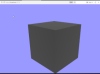
Объект с (зеленым диффузным) материалом экспортируется, но при загрузке проекта выглядит серым. Подскажите пожалуйста как решить проблему. Спасибо. Blender 4.5.3. Прилагаю main.js файл.
import * as THREE from 'three';
import { GLTFLoader } from 'three/examples/jsm/loaders/GLTFLoader';
import { OrbitControls } from 'three/examples/jsm/controls/OrbitControls';
const scene = new THREE.Scene();
scene.background = new THREE.Color( 0x9999ff );
const camera = new THREE.PerspectiveCamera( 45, window.innerWidth / window.innerHeight, 0.1, 1000 );
const renderer = new THREE.WebGLRenderer();
renderer.setSize( window.innerWidth, window.innerHeight );
renderer.setAnimationLoop( animate );
document.body.appendChild( renderer.domElement );
//const gridHelper = THREE.GridHelper(100, 100);
//scene.add(gridHelper);
const loader = new GLTFLoader();
loader.load( '../model.glb', function ( gltf ) {
scene.add(gltf.scene);
} );
const ambientLight = new THREE.AmbientLight(0xffffff, 0.5); // Soft white light
scene.add(ambientLight);
const directionalLight = new THREE.DirectionalLight(0xffffff, 0.8);
directionalLight.position.set(1, 1, 1).normalize(); // Position the light
scene.add(directionalLight);
camera.position.set(0, 0, 5);
camera.position.z = 0.1;
camera.lookAt(0, 0, 0);
const controls = new OrbitControls(camera, renderer.domElement);
function animate() {
requestAnimationFrame(animate);
controls.update();
renderer.render( scene, camera );
}
import { GLTFLoader } from 'three/examples/jsm/loaders/GLTFLoader';
import { OrbitControls } from 'three/examples/jsm/controls/OrbitControls';
const scene = new THREE.Scene();
scene.background = new THREE.Color( 0x9999ff );
const camera = new THREE.PerspectiveCamera( 45, window.innerWidth / window.innerHeight, 0.1, 1000 );
const renderer = new THREE.WebGLRenderer();
renderer.setSize( window.innerWidth, window.innerHeight );
renderer.setAnimationLoop( animate );
document.body.appendChild( renderer.domElement );
//const gridHelper = THREE.GridHelper(100, 100);
//scene.add(gridHelper);
const loader = new GLTFLoader();
loader.load( '../model.glb', function ( gltf ) {
scene.add(gltf.scene);
} );
const ambientLight = new THREE.AmbientLight(0xffffff, 0.5); // Soft white light
scene.add(ambientLight);
const directionalLight = new THREE.DirectionalLight(0xffffff, 0.8);
directionalLight.position.set(1, 1, 1).normalize(); // Position the light
scene.add(directionalLight);
camera.position.set(0, 0, 5);
camera.position.z = 0.1;
camera.lookAt(0, 0, 0);
const controls = new OrbitControls(camera, renderer.domElement);
function animate() {
requestAnimationFrame(animate);
controls.update();
renderer.render( scene, camera );
}
Вложения
-
 10,1 КБ Просмотров: 1